

The Pool Is Down: How to Tell It Is Not Your ASIC, and What to Do in the First Hour
*Last updated: 09.09.2026. POOL BTC editorial team.*
A hashrate that drops to zero in your pool dashboard does not prove the pool went down. Most of the time the break sits somewhere between your ASIC and the stratum server: the router, the ISP, a power supply, an overheated hashboard, a firmware update from last night. Telling the two apart takes about five minutes and no tools beyond a browser: read what the miner itself reports, confirm the outage from a second independent source, and compare local hashrate against pool-side hashrate. The first hour is better spent on ordered diagnosis and on the backup stratum you should have configured months ago than on switching pools in a hurry.
POOL BTC is an independent pool comparison site, not a mining pool. Nothing below attributes an outage to any named pool: this is method, not incident coverage.
How do you tell a pool outage from a problem on your own side?
The signature of a real pool outage is simple: the miner hashes normally, local hashrate holds steady, and the stratum connection drops or shares stop being acknowledged. If instead the ASIC's own dashboard shows reduced hashrate, missing chips, or a reboot loop, the pool is irrelevant. That is hardware, power, or the network segment before your ISP.
Read two places at once: the miner panel (local hashrate) and your account statistics on the pool (pool-side hashrate).
| What you observe | Local hashrate | Pool-side hashrate | Likely cause |
|---|---|---|---|
| Connection drops, shares unacknowledged | normal | zero or falling | pool side or the route to it |
| Hashrate fell in one step | down | down the same | dead hashboard, thermal throttle, PSU |
| Miner reboots in cycles | erratic | ragged | power, temperature, unstable firmware |
| Everything green locally, pool shows zero | normal | zero | wrong worker name, account, port or payout address |
| Rejected share ratio climbing | normal | below local | network, latency, rarely pool load |
One case gets mistaken for an outage more than any other: a fresh setup. If pool-side hashrate never appeared at all, that is a typo in the worker string or a blocked port, not a failure. A real outage looks different: it worked for days, then stopped at once.
What does the miner panel show when the stratum connection breaks, and what do accepted, rejected and stale shares mean?
Every ASIC panel keeps three counters per pool: accepted, rejected and stale. When the stratum link breaks, the pool status flips to dead or disconnected, the accepted counter freezes, and the miner starts trying the next pool in its list, assuming you gave it one. The counters themselves tell you whether the link is broken or merely degraded.
What the words mean:
- Accepted. The pool received your share and credited it. This is the only counter that becomes money.
- Rejected. The pool received the share and refused it. Causes vary: stale work, duplicate, difficulty below target, authorization failure.
- Stale. A specific rejection: the share was computed against a job the pool already cancelled because a new block arrived. Higher latency to the server means more of these.
- Difficulty accepted. Some firmware reports the summed difficulty of accepted shares. It is more informative than the raw count, because with vardiff the number of shares by itself means nothing.
The most underused field is the last accepted share timestamp. If it keeps growing past a few minutes while hashrate stays flat, the connection is dead in practice, whatever colour the status indicator shows.
Why share counts do not translate directly into payouts is covered in the breakdown of FPPS and PPLNS payout models.
What rejected share percentage is normal, and what is already a warning sign?
There is no universal number. Rejected share ratio depends on distance to the stratum server, link quality, firmware and vardiff settings, so a figure that is fine for one farm is a red flag for another. The usable benchmark is your own baseline: record your normal ratio on a quiet day and treat any sustained move above it as the signal.
A practical routine instead of a magic number:
- Measure your rejected ratio across a full day of normal operation. That is your zero.
- Watch the hourly average, not the instantaneous value. Spikes around block changes are expected behaviour.
- Ratio rising while local hashrate stays flat points at the link or the pool, not the hardware.
- Ratio rising together with falling local hashrate points at the hardware.
Three pools do name their own benchmarks, and they disagree with each other more than miners arguing in chat. AntPool's help centre says a rejection rate below 1 percent is normal, with a stale rate around 0.5 percent or lower. ViaBTC calls a rejection rate within 3 percent the normal range. F2Pool describes roughly 2 percent as a reasonable delayed share rate. That spread, 0.5 to 3 percent across three major pools, is the answer to the question about the norm: there is no shared norm, there are individual pool settings.
A note on sourcing: the support pages of these pools block automated access, so the wording above was captured from their public search snippets rather than from the full page text. Before you lean on a specific number, open your own pool's help centre and check the current version.
Nobody publishes a threshold at which the loss becomes material, and there is no need to invent one, because the mechanics are arithmetic. A rejected share is not paid, so the rejection ratio is roughly the ratio of revenue you never receive. One percent rejected is about one percent of revenue gone, three percent is three. Whether that justifies reworking your setup depends on the size of your farm, not on somebody else's recommendation.
One case needs no statistics at all: a rejection ratio close to one hundred percent. That is almost always a difficulty mismatch, broken firmware, or an intercepted connection, not pool congestion.
Where do you look to confirm the pool is actually down?
Confirmation always requires a second independent source. Your own panel cannot distinguish a pool failure from an outage at your ISP, because both look identical from inside the shed. The following order runs from fastest to slowest, takes roughly five minutes, and almost always settles the question.
- Your account hashrate on the pool. If the web dashboard loads and shows zero for your worker, the server is alive and your shares specifically are not arriving. If the dashboard does not load at all, the problem is broader.
- The pool status page. Some pools maintain a separate service status page. Find its address on a calm day and bookmark it, rather than searching for it mid-outage.
- Third party monitors and explorers. Public hashrate distribution trackers show whether the pool is still finding blocks. An unusually long gap for a large pool is indirect but strong evidence.
- Pool social accounts and chat. The official channel usually acknowledges an incident before the status page updates, and other miners complaining in the same minutes is confirmation by itself.
- A connectivity check from your side. A plain telnet or nc to the stratum host and port, from any machine on the same network, separates a pool failure from ISP-level blocking in about ten seconds.
If the dashboard loads, blocks are still being found, the chat is quiet, and your shares are not landing, the failure is yours.
Why do you need a backup pool in the config, and how do you set up failover correctly?
A backup pool is a line in the miner configuration that the device switches to on its own when the primary stratum stops responding. Without it, an ASIC that loses its pool simply spins its fans and earns nothing until a human intervenes. With it, downtime shrinks to reconnection time measured in seconds, including at three in the morning while you sleep.
Firmware details differ, but the principle is identical everywhere: an ordered list, tried top to bottom.
```
pool1: stratum+tcp://[PRIMARY POOL HOST]:[PORT] worker: account.worker
pool2: stratum+tcp://[BACKUP POOL HOST]:[PORT] worker: account2.worker
pool3: stratum+tcp://[THIRD POOL HOST]:[PORT] worker: account3.worker
```
Rules that decide whether the failover actually saves you:
- The backup must be a different pool, not a different port on the same one. An alternate endpoint inside the same infrastructure fails together with that infrastructure. Put the primary pool's secondary port in slot three, not slot two.
- Register and verify the backup account in advance. Signing up during an incident consumes exactly the hour you are trying to save.
- Fill in the payout address on the backup. Otherwise the mined balance sits there unclaimed until you remember it weeks later.
- Test the switch by hand. Disable the primary in the interface for two minutes, confirm shares move over, then confirm the miner returns when it comes back.
- Account for the payout scheme. Bouncing between two PPLNS pools resets your position in the window twice, so a simpler scheme makes a calmer backup. The mechanics are compared in FPPS versus PPLNS.
The number of entry points differs from pool to pool, and it is visible in their own documentation. We counted the unique BTC stratum hosts listed on the connection pages of six pools.
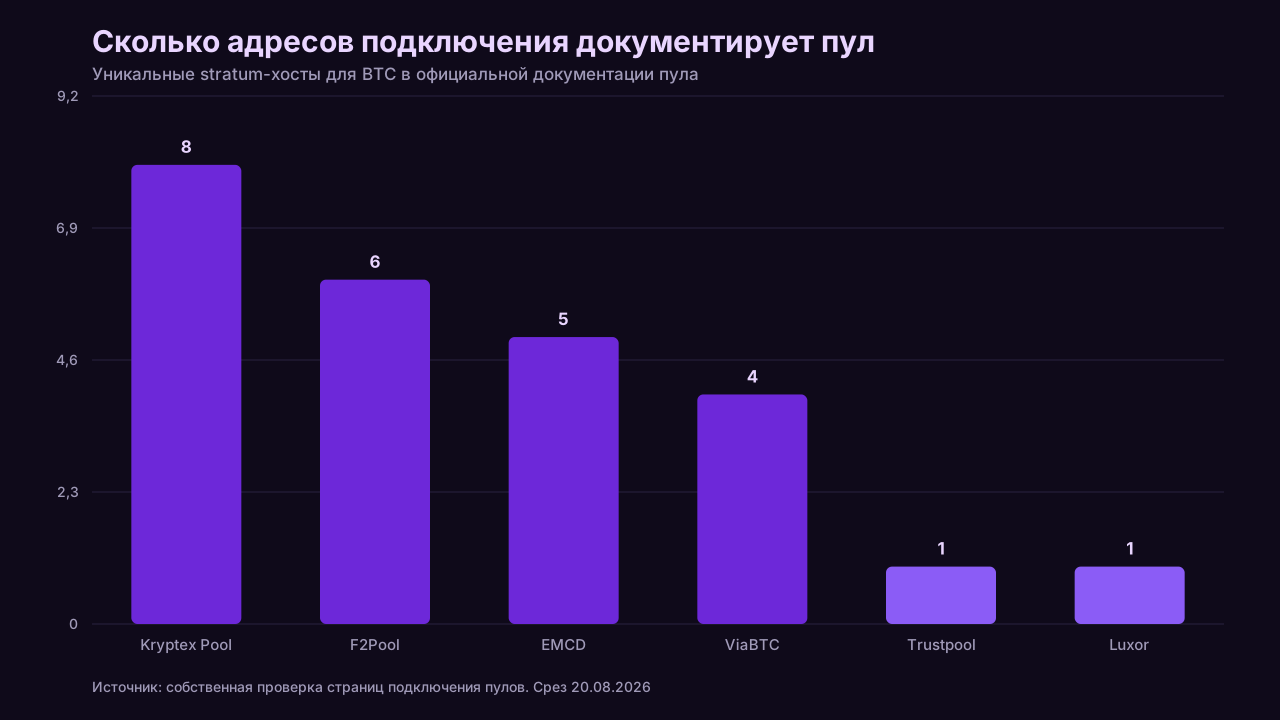
The point is not that one pool lists eight hosts and another lists one. The point is that all of those addresses lead into the same infrastructure: they cover a regional failure, not a pool failure. That is exactly why the second line in your config has to point outside.

How much does an hour of downtime actually cost, and how do you calculate it yourself?
Downtime cost is one line of arithmetic: daily revenue divided by 24, multiplied by hours lost. Pool revenue is linear in hashrate, so no model is required. The only input that matters is a current hashprice, because using a figure from six months ago can put the answer off by a multiple rather than a few percent.
The formula:
```
loss = (hashrate in TH/s x hashprice in USD per TH/s per day) / 24 x hours down
```
Hashprice is revenue per terahash per day before electricity. It moves daily with price and difficulty, so substitute a fresh value.
We deliberately do not freeze a hashprice number in this text. It moves daily with price and difficulty, and a figure from a month-old article is wrong by multiples, not by percent. Substitute a fresh value on the day you calculate: public hashprice indices and our calculator both show it.
Three things people forget in this calculation:
- Electricity keeps burning during the outage. A miner that is powered on but cannot submit shares still draws power, so the real loss exceeds lost revenue by that consumption.
- PPLNS penalises downtime twice. In accumulating schemes you lose the hour of revenue and your position in the window, which rebuilds gradually. Under PPS-style schemes the loss equals the formula exactly.
- Calculate across the whole farm. Ten machines down for an hour costs ten times as much, and that number usually settles the backup pool argument without further discussion.
Running the numbers against your own hashrate and current network parameters is easier in the calculator than on paper.
What should you do in the first hour: step by step checklist
- Minutes 0-2. Check local hashrate in the miner panel. If it fell together with pool-side hashrate, this is hardware and the rest of the list does not apply.
- Minutes 2-5. Check pool status and the last accepted share timestamp. A dead status plus a growing timestamp confirms a broken link.
- Minutes 5-10. Open the pool dashboard and its status page. If nothing loads, including unrelated sites, the problem is your connection.
- Minutes 10-15. Test stratum reachability from another device on the same network, then from mobile data. A difference between the two points at the router or the ISP.
- Minutes 15-20. Read the pool chat and social feed. A wave of reports in the last few minutes closes the question.
- Minutes 20-30. Verify the backup took over. If there is no backup in the config, add one now. It is the only action that restores revenue immediately.
- Minutes 30-45. Change nothing else. Mass reboots, reflashing and difficulty tweaks during someone else's outage add a second failure on top of the first.
- Minutes 45-60. Record the facts. Start time, panel screenshot, last share timestamp, the pool's own statement. Without them, any later compensation discussion becomes an argument about memory.
When is an outage a reason to switch pools, and when is it not?
A single incident is not a reason to move. Infrastructure fails everywhere, and the cost of switching frequently exceeds the revenue lost to a few hours of downtime. The case for moving builds when outages repeat, run long, and come without communication: silence during an incident does more damage than the incident.
| Situation | Switch pools |
|---|---|
| One-off drop, recovery in minutes, explanation published | no |
| Outages recurring weekly, often at the same hour | yes |
| Long outage, but recovery progress is posted | probably not |
| Pool silent on both chat and status page | yes |
| Statistics did not reconcile afterwards and were never corrected | yes |
| Your shares fail while everyone else mines fine | no, that is your side |
Before moving, price the move itself: a reset PPLNS window, a fresh payout threshold to reach, and reconfiguration time. If the appeal of leaving is independence from someone else's infrastructure, read the solo versus pool comparison first, because there the same dependency simply changes shape.
Why do almost no pools publish uptime, and how do you judge reliability indirectly?
A public uptime page is a commitment with no upside for the operator: any number invites disputes and comparisons, and measuring it honestly requires external monitoring. So most pools publish found blocks and hashrate instead. Reliability has to be judged indirectly, from observable behaviour rather than a claimed percentage.
What to look at when there is no uptime figure:
- Regularity of found blocks. For a large pool, gaps are statistically predictable from its network share, and an abnormally long silence is visible in any public explorer.
- Existence of a status page and incident history. The fact that a pool keeps a public incident log says more than a polished 99.9 figure.
- Speed and substance of communication. A message in chat within the first minutes is worth more than an apology post the next day.
- Number of independent entry points. Multiple regions, multiple stratum hosts, several supported ports. Each one lowers the chance you lose connectivity entirely.
- Miner reports about past incidents. Not whether incidents happened, but whether the statistics reconciled afterwards.
We checked the public materials of eight pools on 2026-09-09. A full status page with incident history and uptime figures turned up at exactly one: Luxor publishes it at uptime.luxor.tech, broken down by service (pool interface 99.766 percent, stats processing 99.956 percent, several services at 100 percent) with a three month log. Foundry has status.foundry.ac, but that covers Foundry Digital corporate services rather than the mining pool as a separate product. F2Pool keeps an announcements section with incident posts, which is not a status page. ViaBTC quotes 99.99 percent in marketing materials, and we found no page where that number can be verified. For AntPool, Braiins Pool, Binance Pool and Ocean no public status page was found. That last line means "not found during this check", not proven absence.
| Pool | Status page | Incident history | Published uptime |
|---|---|---|---|
| Luxor | yes, uptime.luxor.tech | yes, three months | yes, per service |
| Foundry USA | partial, company status | yes | yes, company services |
| F2Pool | no, announcements only | yes, as posts | not found |
| ViaBTC | not found | not found | marketing only |
| AntPool | not found | not found | not found |
| Braiins Pool | not found | not found | not found |
| Binance Pool | not found | not found | not found |
| Ocean | not found | not found | not found |
Check of public pool pages, 2026-09-09.
Comparable pool parameters, including payout schemes, fees and thresholds, are collected in the pool cards. Uptime is absent there for exactly the reason above: there is nothing to compare while pools do not publish it.
In short
Pools go down less often than the first minute suggests. The sequence never changes: separate your hardware from their server, confirm the outage from a second source, then make sure a backup stratum picked up the load. A backup pool costs nothing to configure and saves hours of revenue, and the day to configure it is a calm one, not this one.
This article contains referral links to mining pools (marked as sponsored). We may receive a reward if you register through them. This does not change the figures or the order of rows in the tables: the terms are taken from the pools' official pages.