
Hardware wallets for mining pool payouts: what they actually protect and what breaks under frequent small deposits
Most miners buy a hardware wallet after a scare. An exchange asked where the coins came from, or the balance simply grew past the point where keeping it in a phone app feels comfortable. What follows is the part device reviews skip. A pool pays often and in small amounts, a signing device is built around rare and deliberate spends, and those two rhythms fit together worse than the product page suggests.
Who is writing this: POOL BTC is not a pool, not a wallet, and not a hardware store. It is an independent site that compares pools, calculators and services, so there is no device to sell at the end of the text. What follows is mechanics and sequence, not personal financial or legal advice.
The custodial versus self custody argument, along with account freezes and source of funds paperwork, lives in a separate piece on choosing between a custodial and a self custody wallet. Wallet types, dust and payout thresholds are covered in the guide to wallets for mining payouts. This article assumes you already decided to hold your own keys and deals only with the device itself.
What does a hardware wallet actually protect, and what does it not?
A hardware wallet protects the private key from whatever is happening on your computer: malware, clipboard hijacking, tampered wallet installers, remote access tools. The key is generated inside the device and never leaves it, and transactions are signed there. Everything outside that boundary stays your responsibility, and price does not change the list.
What the device does not cover:
- A lost or stolen seed phrase. Whoever holds the words does not need your device.
- Signing a transaction you did not verify on the device screen. Malware on the computer can swap the destination address, and your eyes are the last check.
- Physical coercion. The device cannot tell you apart from the person standing next to you.
- A typo in the payout address field in the pool dashboard. The pool sends coins where you told it to.
- Exchange questions about the origin of funds. Hardware has no effect on compliance.
One note on buying. The device must generate the seed itself during first setup. A card with words already written on it in the box means the wallet was created by someone else. Buying from a marketplace reseller saves a little and adds a risk that is hard to verify at your kitchen table.
How is a hardware wallet different from a phone wallet and from an exchange address?
The difference is where the key lives and who can sign. In a phone wallet the key sits on an internet connected device. On an exchange you hold no key at all, only a balance entry in the service database. With a hardware wallet the key is isolated and your phone or laptop acts as a screen and a network connection.
| Criterion | Hardware wallet | Phone or desktop wallet | Exchange address |
|---|---|---|---|
| Where the private key lives | inside the device | on an online device | with the service |
| Who signs a transaction | you, with a button press | software on an online device | the service, on your request |
| Exposure to computer malware | signing without your confirmation is not possible | key can be stolen | not applicable |
| Third party freeze | not possible without the key | not possible without the key | possible |
| Payout address stability | permanent address | permanent address | deposit address may rotate |
| Convenience for frequent small spends | low, every spend needs the device | high | high |
| What a broken device costs you | nothing, if the seed exists | nothing, if the seed exists | nothing, login based access |
| Entry cost | price of the device | zero | zero |
The conclusion is not that hardware wins. It is less convenient and it costs money. It wins in exactly one scenario: when the balance has grown to the point where a stolen laptop key would end your mining story entirely.
How do you set up pool payouts to a hardware wallet?
The sequence is nearly identical across vendors: the device creates a wallet, you take a receiving address, verify it on the device screen and paste it into the payout settings at your pool. A small test payout before you route the whole flow is mandatory, because a pool may or may not accept your address format.
- Unpack the device and check the packaging before powering it on.
- Update the firmware through the official vendor application, not through a link from an email or a search result.
- Create a new wallet on the device and let it generate the seed itself.
- Write the seed on paper or metal. Do not photograph it, do not type it, do not save it in notes or cloud storage.
- Run the recovery check the device offers before you send any coins to the address.
- Take a receiving address and compare it against what the device screen shows, not only the computer screen.
- Paste the address into the payout field in the pool dashboard and save the settings.
- Wait for the first payout and confirm it appears in the wallet.
- Record which address belongs to which pool and which worker in your own table.
Step 7 fails more often than the rest, and usually over the address format. Taproot addresses starting with bc1p are officially confirmed as payout addresses by Braiins Pool, Ocean and Kryptex. ViaBTC officially lists legacy, P2SH and bech32 only. The remaining pools in our review simply do not document the format, which means no confirmation rather than refusal. Check inside your own dashboard, ideally with a test payout. Pool conditions themselves are easier to compare side by side in the mining profitability calculator.
What are a seed phrase and a passphrase, and how do you store them without losing access?
A seed phrase is the set of words from which every key and address in the wallet is derived deterministically. The BIP-39 standard describes mnemonics of 12, 15, 18, 21 or 24 words. A passphrase is an extra word or string applied on top of the seed: with it the same words produce a different wallet, without it they produce the original one.
Two consequences trip people up. A passphrase is not a device password and not a PIN. A forgotten passphrase cannot be recovered, because the wallet exists purely as the result of that calculation. And the seed without a passphrase still opens a working wallet, just an empty one or one holding a different amount, if your main funds sit behind the hidden variant.
Here is what official documentation says per model as of 09.09.2026:
| Model | Seed phrase at setup | Passphrase |
|---|---|---|
| Trezor Safe 3 | 12 BIP39 words by default, also supports 12, 18 and 24 word BIP39 and SLIP39 | yes, hidden wallets |
| Trezor Safe 5 | 20 word single share SLIP39 by default, Legacy Backup Types offer 12 or 24 word BIP39 | yes, multiple passphrase wallets |
| Coldcard Q | 12 or 24 BIP39 words | yes, entered by keyboard, CLI, microSD or QR |
| Coldcard Mk4 | 12 or 24 BIP39 words | yes, entered directly on the device |
| Coldcard Mk5 | 12 or 24 BIP39 words per the general product line documentation | yes, per the general Coldcard documentation |
| Ledger Nano S Plus | 24 words, the standard Secret Recovery Phrase | stated in the documentation as the 25th word |
| Ledger Nano X | 24 words, the standard Secret Recovery Phrase | stated in the documentation as the 25th word |
Trezor sources: Trezor Safe 3 FAQs, Trezor Safe 5 FAQs, backup length explained. Coldcard sources: BIP-39 Passphrase docs and Coldcard Q setup. We found no dedicated official Mk5 setup page stating the seed length explicitly, so the Mk5 row rests on the general product line documentation.
One honest caveat about Ledger. Passphrase support for the Nano S Plus and Nano X is stated in the vendor help centre (on the 24 word phrase, on setting up a passphrase), but we could not pull the content of those pages directly and quote the wording. Before you build a hidden wallet scheme on a Ledger, open the current vendor help centre yourself and check it there.
What to do about the backup medium:
- Paper survives until the first flood or fire. A metal plate solves that and costs far less than the wallet contents.
- Keeping the backup in the same place as the device means one stolen bag solves both of a thief's problems.
- Splitting a seed into two halves across two locations does not double security. It creates two places where half a phrase sits unprotected. For splitting there are proper secret sharing schemes built into some devices.
- The passphrase is stored separately from the seed and recovered by you alone.
- Heirs and family should know what the envelope is for, otherwise the backup protects the coins from you as well.
One 2026 item on generation reliability, and it is worth knowing regardless of brand. Coinkite published a warning about an entropy generation bug on Coldcard: after the 2021 move to libsecp256k1, a function name collision meant the firmware build pulled seed entropy from the MicroPython software generator instead of the dedicated hardware source. Seeds created between 2021 and July 2026 on affected firmware are in scope. On the Mk3 running firmware 4.0.1 and later the effective search space dropped to roughly 40 bits instead of 128; on Mk4, Mk5 and Q additional entropy from the secure elements partly compensated, but effective strength is still estimated at around 72 bits. The vendor recommendation is to move to fixed firmware (4.2.0 for Mk2 and Mk3, 5.6.1 for Mk4 and Mk5, 1.5.1Q for Q), generate a new seed and move funds to it, adding your own entropy during generation: at least 65 key presses, or 50 dice rolls, or 128 coin flips. Primary sources: Coldcard Security Advisory, technical deep dive into the entropy issue, Security Update 5.6.1 and 1.5.1Q, accessed 09.09.2026.
We did not find comparable official advisories about seed or address generation bugs from Trezor or Ledger in this pass. That is an unfinished search, not a claim that none exist: we did not get deep into the security sections of either vendor. The lesson is brand independent anyway. A seed generated once does not stay valid by default, and your vendor security page is worth opening once a quarter.
Why do regular small payouts to one address create a UTXO and fee problem?
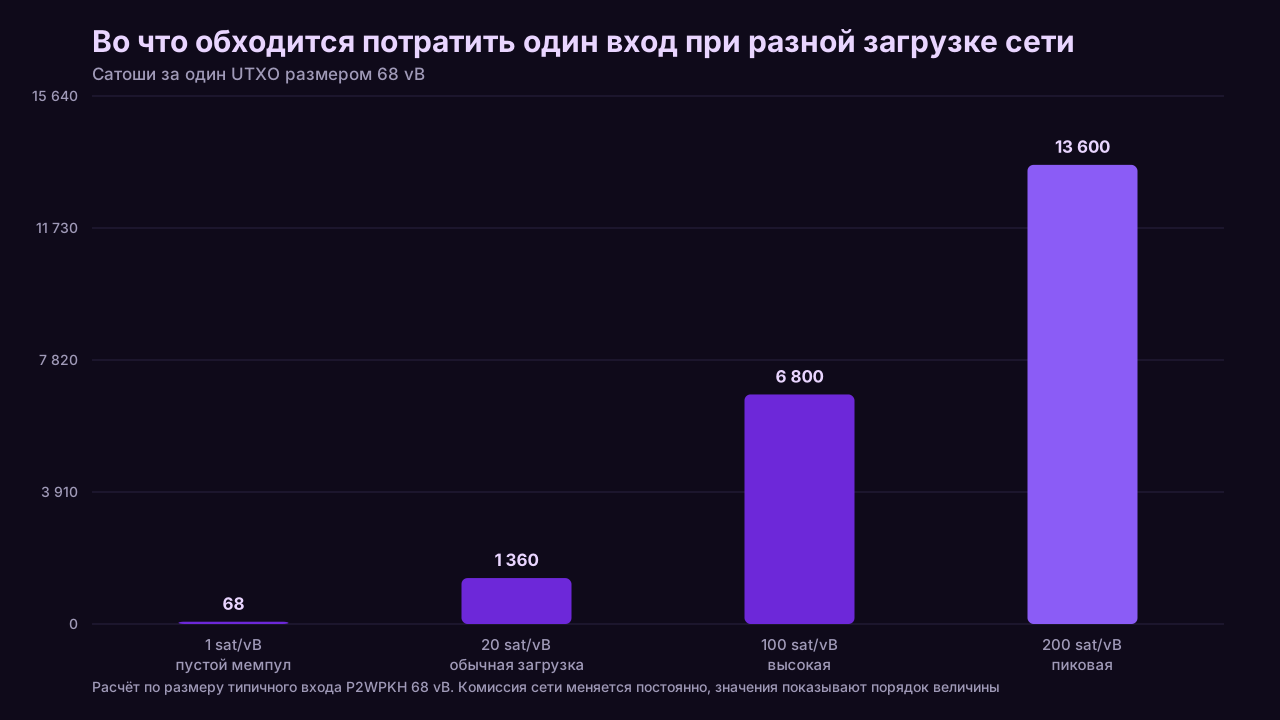
Because Bitcoin fees are paid for transaction size, not for the amount moved. Every pool payout lands in the wallet as a separate unspent output, and spending means including each of them as an input. A hundred small deposits become a hundred inputs, and you learn the price of that when you send, not when you receive.
The order of magnitude is easiest to see on a single P2WPKH input weighing roughly 68 vB. At 1 sat/vB spending it costs around 68 satoshi, at 200 sat/vB around 13,600 satoshi (Spark, UTXO Management Guide, accessed 27.08.2026). A payout smaller than that stays on the balance as a number but stops moving economically until the network calms down.
On a hardware wallet this hurts more than on a hot wallet, for two reasons. Signing a transaction with many inputs requires confirmation on the device and on some models runs into interface and memory limits. And consolidation, meaning sweeping small outputs into one, requires you to fetch the device, plug it in and do the job by hand, which is easy to postpone until fees are high again.
What people do in practice:
- Raise the payout threshold in the pool dashboard so one deposit comfortably exceeds the cost of spending one input at a high fee rate.
- Receive the flow into a hot wallet with coin control and send a consolidated amount to the hardware wallet once per period.
- Consolidate on quiet network days rather than on a calendar date.
- Resist the lowest possible threshold. Daily deposits feel good and cost money at spend time.
How the threshold ties into waiting time for the first deposit is covered in the article on time to first payout.
Do you need a separate address for every payout, and how does xpub fit in?
A fresh address per deposit is good for privacy and bookkeeping, but a pool almost always accepts exactly one static address in its payout settings, not an extended public key. So in practice a miner reuses one address many times and solves the problem differently: one address per pool rather than one per payout.
The mechanics are worth understanding. Modern wallets are hierarchical and deterministic. One seed derives a tree of keys, and the account level extended public key (xpub, or zpub and its relatives in the formats used for bech32 and Taproot) can generate any number of receiving addresses without touching private keys. That is exactly why a watch only wallet on your laptop sees every deposit and can spend nothing.
We checked nine pools against their public documentation on 09.09.2026. None is confirmed as accepting an xpub in the payout field. The statuses differ, though, and the difference is worth holding on to.
| Pool | What the official documentation says | xpub status |
|---|---|---|
| Luxor | payout address is entered by hand through New Wallet Address, a static BTC address only (Luxor Pool Reference) | confirmed static address |
| Ocean | plain BTC addresses and Lightning payouts over BOLT12, no mention of xpub (OCEAN, Lightning Payouts) | confirmed static address |
| Kryptex | payouts are tied to the single address the worker started with (Kryptex Pool, Address) | confirmed static address |
| F2Pool | only mainnet address rules are described, xpub is not mentioned (F2Pool, notes for payout address) | could not verify |
| AntPool | the setting is described as a single BTC or BCH address (AntPool, Wallet Address) | could not verify |
| ViaBTC | no dedicated page with a clear answer was found | could not verify |
| Braiins Pool | documentation describes adding ordinary addresses through Add New Wallet (Braiins Academy, Rewards and Payouts) | could not verify |
| EMCD | configuration is described as a single external address confirmed by email (EMCD, how payments work) | could not verify |
| NiceHash | payouts go to the internal NiceHash wallet, nothing published about an external xpub (NiceHash, paid to an external wallet) | could not verify |
The two labels are not the same thing. "Confirmed static address" means the pool itself described the field as one address. "Could not verify" means exactly that: the public documentation says nothing about xpub either way, and reading that as a refusal would be wrong. The practical takeaway is the same in both cases. Planning around pool side address rotation via xpub is not realistic today, and that lands directly on privacy, because the entire payout history from one pool piles up on one address and is visible to anyone who knows it.
What that means step by step:
- Create one address per pool, not per payout. Then a block explorer shows what each pool brought in, and one pool's history does not blend into another's.
- Keep an xpub backup alongside your bookkeeping. It restores the address list and full history without touching the seed.
- Changing the receiving address inside one wallet needs neither a new device nor a new seed. It is simply the next address in the same tree, and nothing stops you from rotating it by hand once per period.
- Reusing one address does not break the security of the funds. It exposes the link between all your deposits to anyone who knows a single address of yours.
What do you do when you switch pools or switch wallets?
Switching pools comes down to changing the address in the new dashboard and watching the leftover balance in the old one, since a pool pays out on its own threshold and anything below it can sit there until that threshold is reached. Switching wallets means moving funds to new addresses with your own transaction, because the old seed stays live as long as anything sits on its addresses.
Migrating to a new device:
- Set up the new device and create a new wallet with a new seed.
- Take a receiving address and verify it on the screen.
- Change the payout address in every pool dashboard you use.
- Wait for the old pool or pools to reach the threshold and release the remaining balance to the old address.
- Move the remainder from the old wallet in one transaction during a quiet fee period.
- Do not destroy the old seed immediately. Keep it until you have confirmed the old addresses are empty.
- Update the address, pool and worker table so the yearly report does not turn into archaeology.
What a pool migration costs in money and time was measured in the piece on the cost of switching pools.
What happens if the device breaks, gets lost, or the vendor leaves the market?
Coins live on the blockchain, not inside the device, so losing the hardware costs you access only if you also lose the seed. A BIP-39 compatible seed restores in another wallet, including one from a different vendor and one that is pure software. That is what makes the vendor shutdown question less frightening than it sounds.
This insurance has one condition, and it needs checking before purchase rather than after: a standard seed format and standard derivation paths. A wallet with its own non standard mnemonic format ties you to one manufacturer, and then its exit really does become your problem. The second thing to record together with the seed is the address type and derivation path, otherwise a restore in third party software shows an empty balance with perfectly correct words.
We are not naming specific vendors that left the market, with dates, because we found no examples backed by official announcements in this pass, and not finding them is not the same as none existing. What is documented is something else and more useful: a vendor can publicly admit its own mistake and ask owners to regenerate a seed, the way Coinkite did in the entropy story above. For an owner that event is both more likely and more expensive in time than a hypothetical company shutdown, and the insurance against both is identical: a standard seed and a written down derivation path.
If the device is lost:
- Treat the PIN as protection against a quick attempt, not as protection forever.
- Restore the seed on a new device or in a software wallet.
- Move funds to a new wallet with a new seed if you have any doubt about the words being safe.
- Change the payout address at every pool after the move.
What to look at in the device itself, and what is officially confirmed
For a steady payout stream the brand and the screen matter far less than four practical things: which address type the device can hand you for receiving, whether the firmware is open, how it behaves when a transaction carries dozens of inputs, and how alive the vendor security channel is. The first three you check in documentation. The fourth you check by how a vendor handled its own bad news, the way Coinkite handled the entropy warning.
The table below holds what official vendor pages confirmed as of 01.09.2026. Prices in US dollars from vendor sites, and the last column is about the mining scenario rather than a general model review.
| Model | Price | Taproot for the receiving address | Open firmware | What that means for a payout stream |
|---|---|---|---|---|
| Trezor Safe 5 | 129 dollars | yes | yes | bc1p available out of the box, though not every pool will accept it |
| Trezor Safe 3 | 59 dollars | yes, Trezor Core firmware | yes | cheapest way to cover storage with the same set of address formats |
| Trezor Model One | not captured from an official source in this pass | not confirmed, device runs the 1.x firmware branch | yes | do not plan around Taproot here, receiving falls back to older formats |
| Coldcard Q | 289 dollars | Edge firmware only, not the main branch | yes | deeper manual input handling than the rest, which helps at consolidation time |
| Coldcard Mk5 | 189 dollars | Edge firmware only, not the main branch | yes | air gapped signing, so every consolidation becomes a memory card ritual |
| Ledger Nano Gen5, Flex, Stax, Nano X, Nano S Plus | no numeric price captured from official pages | no direct official statement obtained | no direct official statement obtained | broad third party software compatibility, treat the rest as unknown until verified |
Trezor and Coldcard prices come from trezor.io and store.coinkite.com. Ledger pages in this pass gave neither numeric prices nor direct wording on Taproot and firmware openness, so those cells are marked as unverified instead of being filled in from memory. Read that as "we found no confirmation", not as "the feature is missing". The Trezor Model One price sits in the same category for the same reason.
The Coldcard point deserves to be said more plainly than a table allows. Taproot there lives in a separate Edge release channel, which the vendor describes as the branch for features that may not be ready for prime time. If you want bc1p as a working receiving address for pool payouts rather than a line in a spec sheet, you will be keeping the device on that branch with everything that implies. Model by model differences are covered in our hardware wallets section.

When is a hardware wallet overkill for a miner?
When the cost of the device and the hassle around it are comparable to the amount you keep. A single home ASIC paying a few hundred satoshi a day, sold immediately on arrival, never builds the balance that justifies the hardware. In that scenario a hot wallet with coin control and a raised payout threshold wins.
Situations where the device adds more problems than it removes:
- You sell mined coins straight away and accumulate almost nothing.
- Payouts arrive so small that each one is close in size to the cost of spending a single input.
- You are not ready for seed discipline, and the backup will inevitably end up in your phone camera roll.
- You are in your first month of mining and have not decided whether you are continuing at all.
The opposite boundary is just as clear. Once the balance reaches an amount whose loss would change your plans, the question stops being whether you need a device and becomes which one and how to store the words.
Short checklist
- Device bought from the vendor and generated the seed itself at first setup.
- Firmware updated and the vendor security page checked.
- Seed written offline, verified with a recovery check, and not stored next to the device.
- Passphrase, if you use one, stored separately and not lost.
- Payout address format tested inside the specific pool dashboard with a small amount.
- Payout threshold raised high enough to avoid accumulating dust.
- One address per pool, with an address and worker table kept from day one.
- An xpub copy saved so history can be restored without the seed.
- Address type and derivation path recorded together with the seed.
- Input consolidation done in quiet fee periods, not during an urgent sale.
Bottom line
A hardware wallet solves one problem: it keeps the private key off a computer that might be compromised. Everything else, from dust and fees to address formats and the order of operations during a pool switch, stays organisational work, and that work decides whether the device helps or sits in a drawer while payouts pile up in a phone app. For a miner the usual arrangement is a hot wallet receiving the flow, a hardware wallet holding the savings, one address per pool, and a seed stored offline in two places and never in the camera roll.
This article contains referral links to mining pools (marked as sponsored). We may receive a reward if you register through them. This does not change the figures or the order of rows in the tables: the terms are taken from the pools' official pages.