
Backup pools and failover: why slots two and three in your ASIC sit empty
Nearly every ASIC firmware ships with three pool address fields. Most miners fill in one. The other two stay blank, or worse, hold a copy of the same address, which makes them decorative. Filling them properly is the cheapest insurance in mining: five minutes of setup, zero cost, and it covers you when your main pool goes down.
Below: how switching actually works, what downtime costs using our own numbers, and the part almost nobody explains, which is what happens to your PPLNS contribution while you sit on the backup.
What the three pool slots actually do
The three slots are a priority list. Your miner holds a stratum connection to the first address. If that connection drops or the pool stops handing out work, the firmware tries the second address, then the third. There is no load balancing and no splitting of hashrate. It walks the list top to bottom, and that is all.
The important detail is that switching is not instant. The miner first has to conclude that the connection is genuinely gone. It waits out a timeout, often retries the primary a few times, and only then moves down the list. How long that takes depends on your firmware and its version, and there is no common standard. Check the actual value in your device web interface under pool settings, or in the logs, where you can see how many seconds passed between the drop and the first request to the second address.
The practical consequence: failover does not protect you from two second blips. It protects you from outages measured in minutes and hours, when a pool is down, its DNS is broken, or your ISP loses the route to one datacenter. For telling a pool side problem apart from your own, see my pool is down: a step by step diagnosis.
One more thing. Most firmwares fall back to the primary pool automatically once it recovers, so the backup behaves as a temporary parking spot rather than a move. Verify that on your own model, since it is firmware dependent too.
What an hour of downtime costs
Start from the expected earnings formula:
```
BTC = H * 86400 * R / (D * 2^32)
```
H is hashrate in hashes per second, 86400 is seconds in a day, R is the block reward in BTC, D is network difficulty. This gives an expectation, not a promise. At small scale actual output wanders around that number.
Plug in the network as of 08.09.2026: difficulty 127.45 trillion, block reward 3.125 BTC, network hashrate 930.73 EH/s, transaction fees at 0.66 percent of block value. Under those conditions 100 TH/s earns 0.00004932 BTC per day. At 78,349 dollars per coin that is 3.86 dollars a day, or 16.1 cents an hour.
Scaling from there:
| Hashrate | One hour down | One day down | Month at 1% downtime (~7.3 h) | Month at 5% downtime (~36 h) |
|---|---|---|---|---|
| 100 TH/s | $0.16 | $3.86 | $1.16 | $5.80 |
| 1 PH/s | $1.61 | $38.65 | $11.60 | $58 |
| 10 PH/s | $16.10 | $386 | $116 | $580 |
| 100 PH/s | $161 | $3,865 | $1,160 | $5,800 |
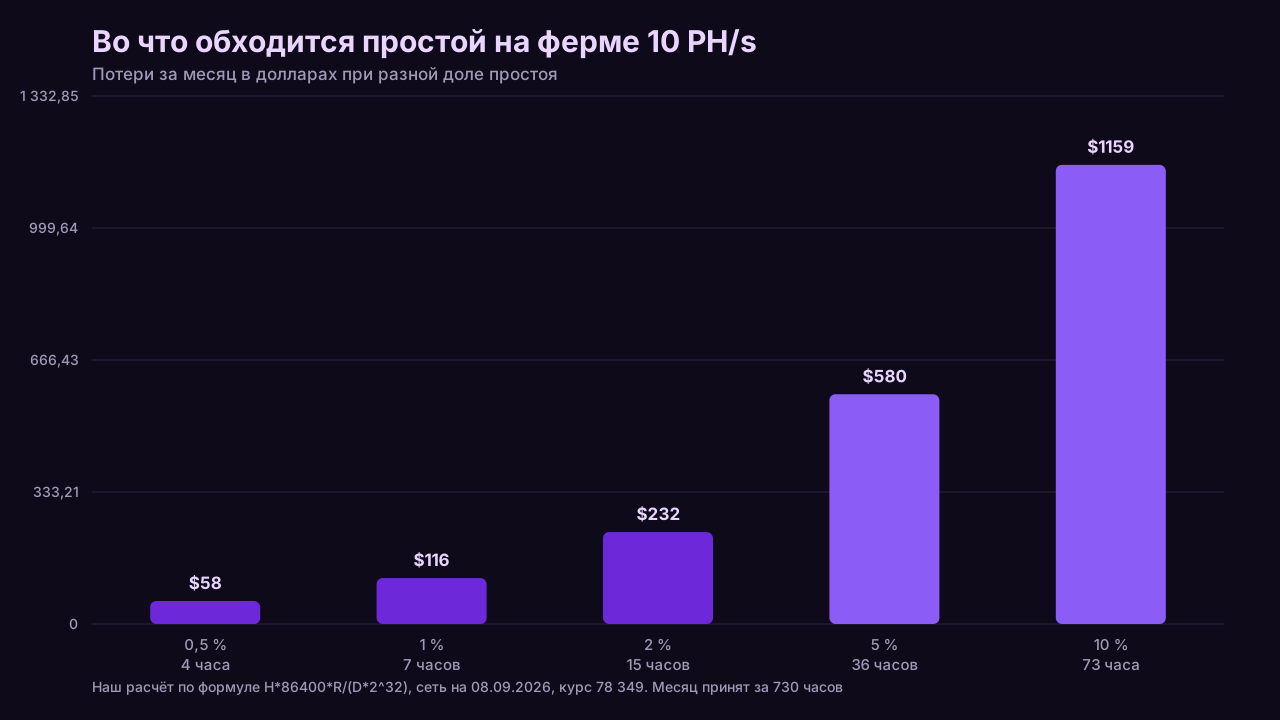
On a single home S21, the gap between 1 and 5 percent downtime is a couple of dollars a month, and failover is more about hygiene than money. At ten petahash the same percentages turn into hundreds of dollars a month, and the second slot pays for itself the first time a pool stumbles. Run your own hashrate and power price through the mining calculator.
Worth remembering that downtime is not free on the cost side either: a miner spinning and retrying its connection still draws power.
What happens to your PPLNS contribution on the backup
Direct answer: with PPLNS, the shares you already submitted are not wiped the moment you disconnect. They stay inside the window and keep earning a cut of blocks the pool finds shortly after, then get gradually pushed out by newer shares from other miners. A short hop to the backup costs noticeably less than people assume. A long one eats the whole contribution.
The mechanics: PPLNS does not pay per share in isolation. It pays your share of the pool last N shares at the moment a block is found. While your shares sit inside that window, every block found pays you a slice. Once other miners have pushed them past the window boundary, they stop counting. Nothing is confiscated. The window simply moves.
Window sizes differ by pool, and so does the way pools describe them. From our documentation review:
| Pool | How the window is described | What that means in practice |
|---|---|---|
| ViaBTC | the past 5 difficulty rounds | an explicit number, so share lifetime is estimable |
| Ocean | TIDES, window equals eight network difficulties worth of shares | the most thoroughly documented window of the set; shares are never removed from the log, they just fall outside the window |
| AntPool | the last N difficulty rounds | the value of N is not published officially, so share lifetime cannot be pinned down |
The rule of thumb follows: the wider your primary pool window, the calmer you can be about brief trips to the backup. Ocean eight difficulty window means a share typically gets counted many times over, so a ten minute outage barely dents anything. With a narrow window the same outage costs more.
The reverse also holds. A multi hour stay on the backup means that by the time you come back, almost none of your contribution remains in the primary window and accumulation restarts from scratch. That is why long outages hurt more under PPLNS than under PPS or FPPS, where payout does not depend on whether the pool found a block.
One caveat. Most large BTC pools run FPPS or PPS+ by default, not PPLNS. If you are on FPPS, none of this window arithmetic applies to you, and an outage costs exactly what you failed to mine, no more.
How to pick a backup pool
Direct answer: match the payout scheme of your primary pool, and do not bother matching its size. Scheme parity matters because it determines how your downtime earnings are calculated and whether you end up reconciling two different payout models in one week. Pool size has no bearing on that.
Why the scheme matters more. If your primary runs FPPS and your backup runs PPLNS, every switch starts building contribution in a foreign window from zero, and that contribution goes largely unused when you return. Reconciliation gets messier too: FPPS income is smooth, PPLNS income tracks block luck. Matching schemes keeps the two venues comparable.
Why size is not critical. Pool hashrate drives payout variance, so a small pool finds blocks less often and pays less evenly. But a backup runs in short bursts by definition. Two hours on a small pool will not hurt you, because under FPPS there is no variance at all, and under PPLNS a two hour contribution is modest either way.
What to check when choosing a backup:
- Payout scheme matches the primary.
- The payout threshold is actually reachable. This is the classic trap, covered below.
- Server geography differs from the primary. A backup in the same datacenter will not survive a datacenter outage.
- Signup does not require a week long KYC process, or you will never get the account ready in time.
- Fees and thresholds are known in advance, which you can compare in our pool fee breakdowns.
For what switching pools costs in general and why frequent moves are not free, see the real cost of switching pools.
Should slot three be solo mining or a completely different pool
Direct answer: slot three should cover a different class of failure, not duplicate slot two. Slot two covers one pool going down. Slot three should cover the case where both are unreachable, for example a routing problem to a whole region or an ISP level block.
Sensible options for the third slot:
- A pool in a different jurisdiction with different network infrastructure. The practical default for most people.
- Solo mining. It makes sense if you genuinely accept near zero income most of the time in exchange for a lottery shot at a full block. As a permanent mode at small hashrate that is a bet, not a plan. As a third slot that activates during rare outages, it costs roughly the downtime figures in the table above.
- The same pool on a different regional stratum endpoint. Covers regional failures but not a full pool outage.
Plenty of people use option three as slot two, which is fine. In that case slot three has to belong to a different operator, or your whole list depends on one company staying up.
Common failover mistakes
- The same address in all three slots. The single most common one. The list looks full, but a pool outage takes out all three entries at once.
- A backup worker nobody ever tested. The login was typed from memory, with a typo, or against a subaccount that does not exist. Nothing breaks while the primary is alive. During the outage the miner switches over and gets rejected at auth.
- A payout threshold you will never reach. If the backup pays out only above a sum your hashrate would need years of rare outages to accumulate, the money just sits on the balance. Some pools keep sub threshold balances rolling into the next cycle, others have rules about inactive accounts and missing payout addresses, up to forfeiting accrued rewards under their terms of service. Read the specific pool terms before naming it your backup.
- Failover configured but never tested. The most frustrating category, because the operator believes they are covered.
- Backup registered on the same payout address and email as the primary, with no separate access check. If you lose account access during the outage, the configured slot does not help much.
- Backup added to only part of the fleet. Across thirty ASICs, a config template guarantees consistency; a manual pass device by device almost always misses a few.
How to verify failover works
Direct answer: verify by deliberately breaking the connection to the primary, not by reading the config. The safest method is to block the primary pool address at the router or temporarily reorder the slots, confirm the miner moved to the second address and is submitting accepted shares, then put everything back.
Step by step:
- Confirm the backup worker exists and shows up in that pool dashboard. The easiest check is to point one miner at the backup for ten minutes and watch hashrate appear on the worker.
- Record the current state: all three slot addresses, worker names, and current hashrate on the primary.
- Cut off the primary. Options: a router rule by domain or IP, closing the specific port, or temporarily replacing the first slot address with a known bad one.
- Time it. Note how many seconds pass before the miner moves to the second address. That is your real failover timeout, and it is the number to use when estimating losses.
- Check the backup dashboard to confirm shares are arriving and being accepted. A live connection alone proves nothing.
- Remove the block and see whether the miner returns to slot one on its own. If it does not, recovery is manual, and your operating procedure needs to say so.
- Repeat for the third slot by blocking both the first and second pools.
- Write down the results and the date. Redo the test after every firmware update, since failover behavior changes between versions.
Fold the test into planned maintenance, when part of your hashrate is idle anyway. The test itself costs what the table says: ten minutes at 10 PH/s runs about 2.70 dollars, a one off price for knowing your protection is real.

The short version
Three slots instead of one will not raise your income. They remove the gaps that otherwise last until you happen to notice the problem yourself. At hobby scale the gain is a few dollars a month. At industrial scale it is hundreds or thousands.
Three things worth keeping in mind. Switching runs on a firmware timeout rather than instantly, so measure yours. Under PPLNS a short trip to the backup costs less than expected, because shares age out of the window gradually instead of vanishing. And failover that has been configured but never tested is not protection, it is the appearance of it.
To estimate what downtime costs your specific setup, use the calculator, and to compare candidate backup pools, start from the pool comparison.
This article contains referral links to mining pools (marked as sponsored). We may receive a reward if you register through them. This does not change the figures or the order of rows in the tables: the terms are taken from the pools' official pages.