
Mining monitoring and alerts: catching downtime in minutes instead of a day later
Downtime on a mining site rarely announces itself. Nothing catches fire, nothing goes dark. A few machines quietly stop sending shares, and you find out the next morning when the payout comes in smaller than yesterday. By then the money is gone for good. Nobody backfills your share of the pool's work after the fact.
This piece covers why a pool dashboard makes a poor alarm system, which numbers warn you before a machine dies, and how to wire up a basic alert from parts you already own.
What an hour of downtime costs
Use the same formula any profitability calculator runs on:
```
BTC per day = (hashrate × 86400) / (difficulty × 2^32) × 3.125
```
86400 is seconds in a day, 2^32 comes from how difficulty is defined, and 3.125 BTC is the current block subsidy (from our network snapshot of 08.09.2026).
Plug in difficulty of 127.45 trillion and a price of $78,349:
| Capacity | Daily revenue | Cost of one idle hour | Cost of one idle day |
|---|---|---|---|
| 100 TH/s | $3.86 | $0.161 | $3.86 |
| 1 PH/s | $38.6 | $1.61 | $38.6 |
| 10 PH/s | $386 | $16.1 | $386 |
That is gross revenue, before the pool fee and before electricity, and it ignores transaction fees (per mempool.space on 08.09.2026 they added 0.66% to block rewards over a 4320 block window, which barely moves the arithmetic).
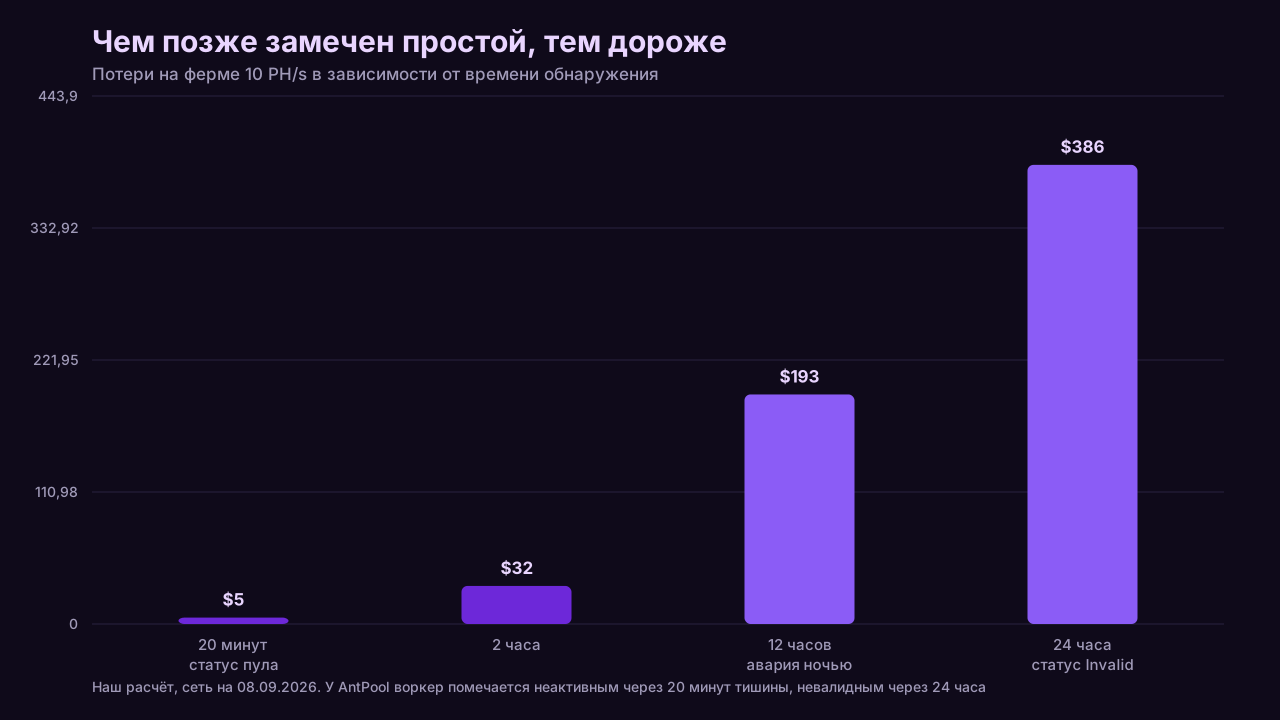
Now the part that stings. A fault at 1am, noticed at 1pm. Twelve hours on a 10 PH/s site works out to roughly $193 that will never appear in a payout. Let that happen once a month and the year costs you over two thousand dollars with perfectly healthy hardware.
Why the pool dashboard is not a monitoring system
Short version: the pool does not show the state of your hardware, it shows the state of the share stream that reached the pool. Tens of minutes can pass between a disconnect and a status change, because the pool has to tell a real failure apart from an ordinary network hiccup. AntPool documents this openly: a worker is marked Inactive after 20 minutes with no shares, and Invalid only after 24 hours of silence (AntPool support, Worker Management).
Twenty minutes is already $5.40 on a 10 PH/s site, and that is the good case, where a worker drops off entirely and the status actually changes. If a machine keeps running at half speed, the status stays green and the pool tells you nothing.
There is a second reason. The hashrate on a pool dashboard is not a measurement, it is an estimate reconstructed from accepted shares over an averaging window. Every pool picks its own window and does not always document it. A short window gives a jumpy graph; a long one reacts late to a real drop.
For pools other than AntPool, check delays and thresholds in their own documentation. AntPool's numbers are the only officially confirmed ones we have, and they do not transfer to anyone else.
Three layers of visibility
There are three places to watch from, and each sees a different slice.
| Layer | What it sees | What it misses | Typical delay |
|---|---|---|---|
| The miner itself (web UI, local API) | board and chip temperatures, fan speeds, per board hashrate, rejected shares, reboots, chip errors | whether the connection to the pool survives past your router, whether shares were credited | seconds |
| Network and power (router, UPS, room sensors) | internet loss, power loss, room temperature and humidity | anything happening inside a given machine | seconds |
| Pool statistics (dashboard, account API) | accepted shares, effective hashrate, worker statuses, credits | the cause of the problem and the state of the hardware | minutes to tens of minutes, see the AntPool example above |
No single layer stands on its own. The miner will report overheating honestly and say nothing when your ISP drops the route to the pool. The pool spots missing shares, late and without a reason attached. A power sensor fires instantly but cannot tell a powered off machine from a frozen one.
The working minimum is layers one and three: local data for the cause, pool data to confirm the work was actually paid for.
Which metrics warn you before a machine dies
Direct answer: reject rate, a persistent gap between local and pool side hashrate, chip temperature, and the reboot counter. These four move before a machine stops completely, which gives you time to act while the loss is still partial.
- Rejected shares. A rising reject rate is almost always the network: packet loss, an overloaded router, a bad route to the pool server. Do not take a "normal" reject percentage from an article. Take it from your own data over a quiet week, because it depends on your hardware and your ISP.
- The gap between local and pool hashrate. This gets its own section below, since it causes more false panic than anything else.
- Chip temperature and fan speed. A dust clogged heatsink heats up gradually. The machine throttles itself first, silently shedding a few percent of revenue, and only later trips its protection. That quiet degradation phase is exactly what a temperature threshold catches.
- Uptime counter. If uptime keeps resetting, you have reboots the pool will never mention: shares flow between restarts, the status stays green, and total output sits lower than it should.
- Number of live hashboards. A dead board on a three board machine is a third of your revenue gone while the worker looks perfectly alive on the dashboard.

Why the pool always shows less than the miner does
Direct answer: the miner reports the search rate it calculated for itself, while the pool reports an estimate rebuilt from accepted shares. The second number is statistical, so it wobbles and averages out lower: some work goes into rejected and stale shares, some disappears into the rounding of the averaging window.
The practical rule is easy. A few percent of difference that drifts up and down through the day is ordinary sampling variance, not a fault. A real signal looks different: the pool side number drops and stays down while the local number holds steady. That pattern means the machine is computing and the result is not arriving, or not being credited.
How big your own normal gap is, nobody can tell you. Collect a quiet week of your own numbers, work out the average ratio of pool hashrate to local hashrate, and build from there. The same applies to every threshold below.
Building alerts without third party services
You need one machine that runs around the clock and can make HTTP requests: a small home server, a router that runs scripts, an old laptop. Then two data sources.
From the miner. An ASIC web interface exposes current hashrate, temperatures, fan speeds, uptime, hashboard state and reject counters. Many firmwares expose the same data in machine readable form through a local API or a control socket. Exact addresses and formats depend on the vendor and firmware version, so check the documentation for your model.
From the pool. Some pools offer an account API with worker hashrates and statuses, accessed with a key from your dashboard. Availability, format and rate limits differ per pool and must be checked in that pool's own documentation. There is no common standard here, and we have not verified endpoints beyond what our own reports cover.
The script logic fits in a dozen lines: poll the miners once a minute, poll the pool every few minutes, compare against thresholds, send a message to a chat app or an email when something breaks. Build the inverse too. If the script itself goes quiet for more than half an hour, the monitor died, not the site. A silent monitor is the worst kind, because it manufactures a sense of control.
Picking a threshold that does not spam you hourly
Direct answer: never fire on a single sample, fire on several in a row. Finding a share is a random process, so brief dips in the graph happen on perfectly healthy hardware. A threshold should require the deviation to persist across several polling intervals. Otherwise you get an alert every hour and stop reading them within a week.
A workable scheme:
- Miner not responding. Two failed local polls in a row. That is not variance, act immediately.
- Hashrate drop. Below your working baseline and staying there for several samples. How far below and how many samples comes from your own quiet week history.
- Temperature. Take the limit from your model's documentation and set the alert comfortably below the protection trip point, so you have room to react before an emergency shutdown.
- Rejected shares. Compare against your own quiet baseline, not an absolute number from a forum post.
- Pool silence. Useful, but remember the delay: AntPool's official Inactive status only appears after 20 minutes. This alert will always arrive later than the local one.
One more rule: every alert needs a cooldown after it fires. Otherwise a single 3am fault becomes forty identical messages, and you spend the morning clearing notifications instead of fixing hardware.
Decide separately what happens when an alert fires. If the site is not in your house, an alert with no remote action attached is just a way to ruin your night. This is where failover comes in: plenty of incidents are not hardware at all, but a problem with the pool or the route to it, and those are solved by automatic switching rather than a drive out. We covered backup pool addresses separately.
A one evening checklist
- Work out your own hourly cost of downtime with the formula above. That single number is what makes the rest of the effort worth doing.
- Collect a baseline: local hashrate, pool hashrate, temperatures and reject rate over one quiet day.
- Check whether your firmware exposes data in machine readable form and write down the address.
- Check your pool's documentation for an account API and its limits.
- Write a one minute polling loop for the miners that writes to a file or a small database.
- Set up four alerts: no response, hashrate drop, temperature, rising rejects.
- Add a cooldown and a dead man check for the monitor itself.
- Test it honestly: unplug the network cable from one machine and time how long the message takes.
- Add a second pool address in the miner config if you have not already.
- Revisit the thresholds after a week with real data. First guesses are almost always wrong.
Step eight is the one people skip, and it is the only step that proves the whole thing works.
Further reading
- Mining profitability calculator: put in your own hashrate and see what a day of downtime costs you specifically.
- The pool is down: telling it apart from your own problem: how to work out which side the fault is on.
- Backup pool: why you configure a second address: failover without you being awake for it.
- Mining pool comparison: fees, payout schemes and withdrawal thresholds.
Monitoring does not raise your revenue. It only stops you from losing what you already earned, and in mining the gap between those two things is very small.